Managing content across multiple tools is time-consuming and frustrating for small businesses. All-in-one content platforms solve this by combining planning, creation, design, scheduling, and performance tracking into a single system. Below are five top platforms for 2026, tailored to different needs and budgets:
| Platform | Strengths | Weaknesses | Best For | Pricing (Starting) |
|---|---|---|---|---|
| Content Maker Studio | All-in-one with 12 AI tools | Newer platform | Small businesses needing simplicity | $38.80/month |
| HubSpot | CRM integration, advanced analytics | High cost, complex for small teams | Mid-sized businesses with larger budgets | $500/month |
| Jasper | AI writing, SEO tools | Limited to writing, requires oversight | Content-focused teams and agencies | $39/month |
| Canva | Easy-to-use design tool | Basic scheduling, no analytics | Visual-heavy businesses | $19/month |
| Notion AI | Flexible content planning and management | Requires setup, lacks publishing features | Teams managing complex workflows | $8/month |
For most small businesses, Content Maker Studio offers the best balance of features, affordability, and ease of use, making it a practical choice for streamlining content efforts in 2026.
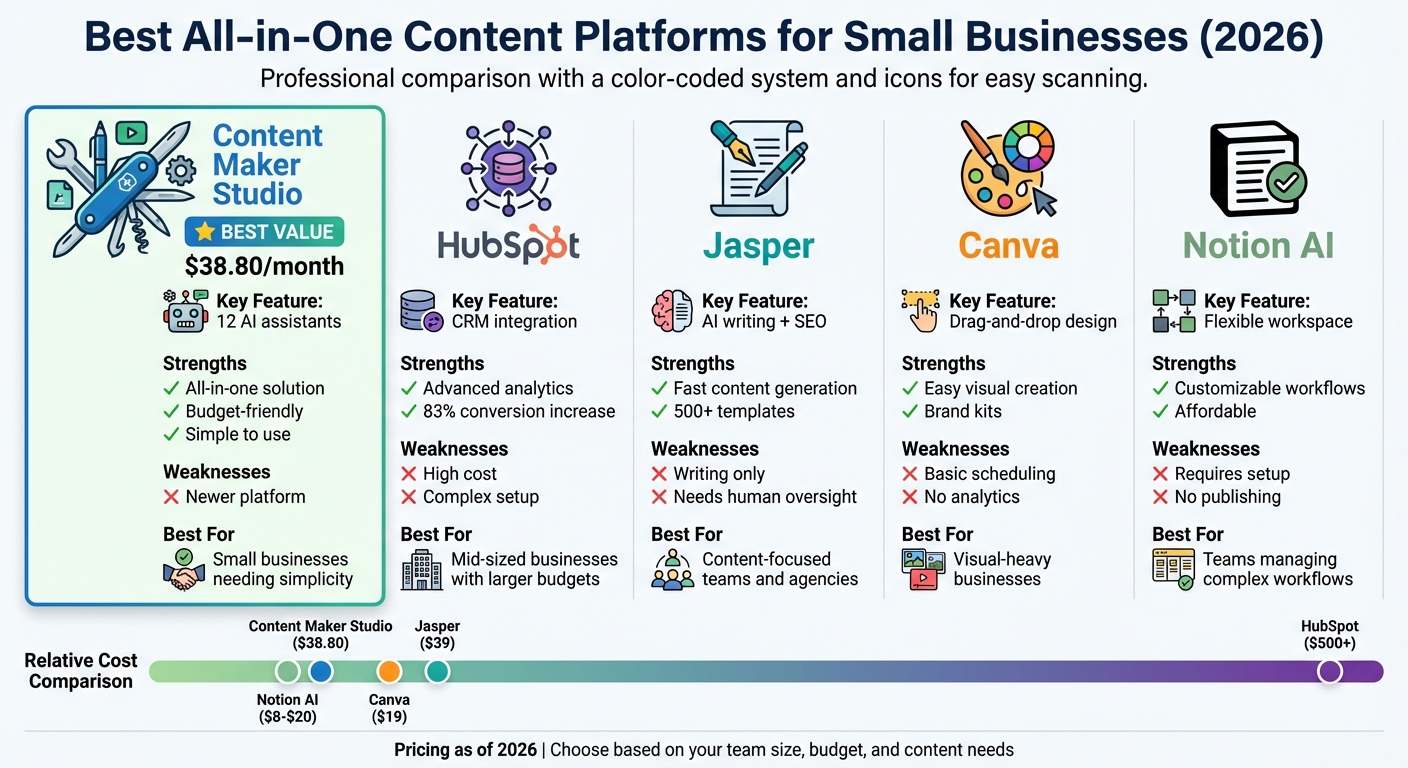
All-in-One Content Platforms Comparison for Small Businesses 2026
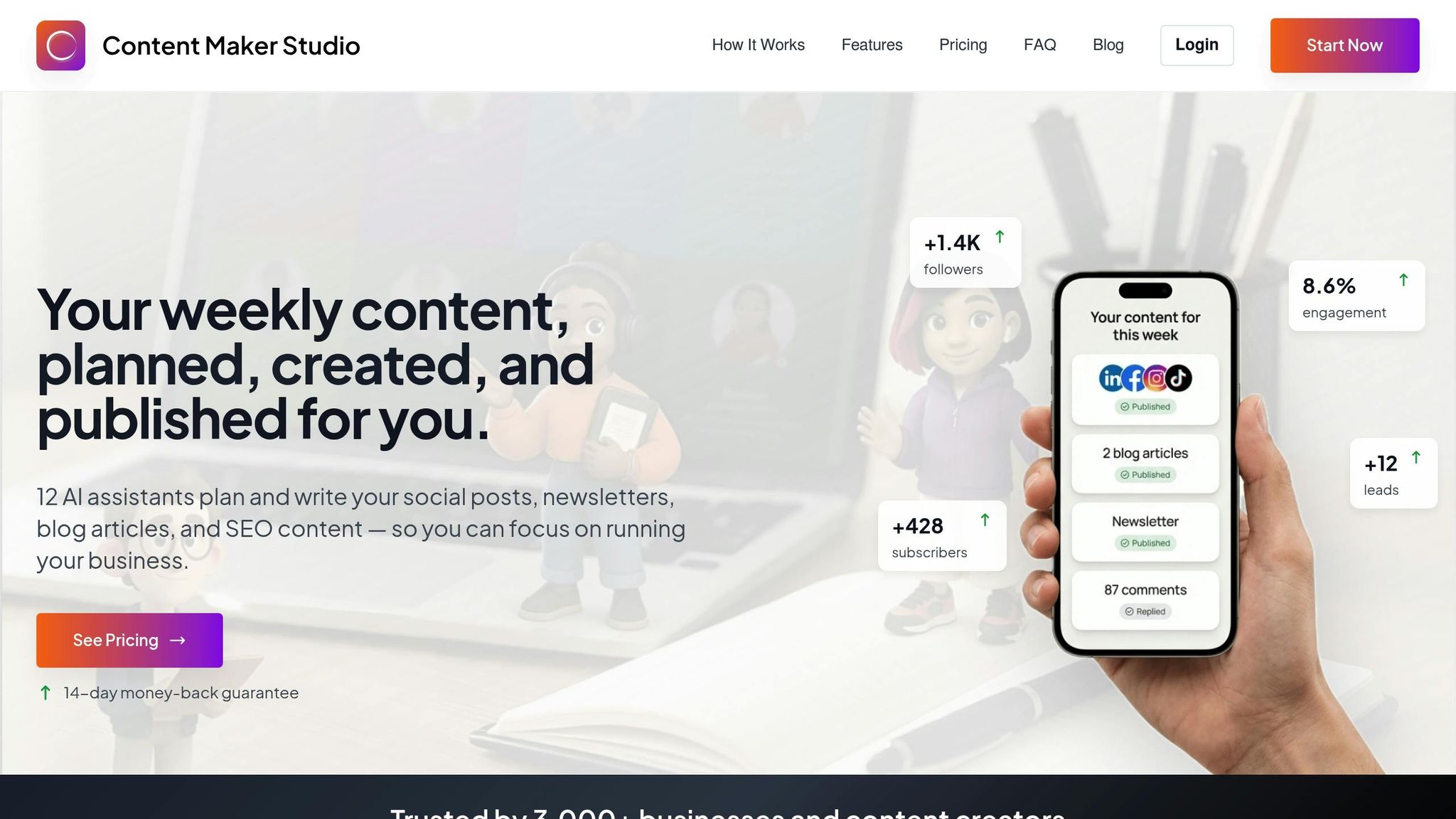
Content Maker Studio is a comprehensive platform designed to simplify content creation for small businesses. It eliminates the need for juggling multiple tools by managing the entire content workflow in one place. This streamlined approach directly addresses the common challenges faced by small business owners and content creators.
This platform is perfect for small businesses, solopreneurs, and lean teams aiming to reduce tool overload while maintaining high-quality, consistent content across various channels. It’s especially helpful for business owners without dedicated marketing teams who still need to deliver professional-grade content to stay competitive.
What sets Content Maker Studio apart is its powerful suite of 12 AI-driven assistants. These virtual helpers act like a built-in content team, handling everything from planning and writing to design, SEO, audience research, trend analysis, and performance tracking. The result? A seamless workflow that ensures every piece of content aligns with your brand’s voice and business objectives.
The platform also combines scheduling, creation, and distribution into a single interface. This eliminates the hassle and cost of managing multiple disconnected tools. With Content Maker Studio, you can draft posts, design visuals, and schedule content all in one place, allowing you to focus on strategy instead of technical tasks.
Content Maker Studio offers straightforward and affordable pricing plans:
All plans include full access to the 12 AI assistants, content creation features, and platform integrations. There are no hidden fees or tiered limitations, making it a budget-friendly option for businesses looking to simplify their content production.
This platform is an excellent fit for small businesses and solopreneurs who need professional, consistent content but lack the resources for a full marketing team. It’s particularly suited for non-technical users who value simplicity and a structured approach to content creation.
HubSpot brings together a content management system (CMS) with CRM, marketing, sales, and service tools, creating an all-in-one platform. By linking content with customer data, it allows businesses to directly measure how their efforts impact revenue. One standout feature is Content Remix, which uses AI to repurpose a single piece of content into multiple marketing assets while keeping your brand's tone consistent [6]. This integration makes it clear which types of businesses can get the most out of HubSpot.
HubSpot shines for B2B organizations and mid-sized businesses that need a centralized system to connect content performance with leads and sales data [4]. It’s especially useful for teams looking to track the entire customer journey - from a prospect’s first interaction on the website to closing a deal - all within one platform.
HubSpot’s biggest strength lies in its seamless integration with its CRM [4]. Users have reported impressive results, such as an 83% increase in conversion rates and a 110% boost in website traffic after just six months of using its content tools [6]. The platform leverages AI to create marketing materials like blog posts, landing pages, and case studies directly from CRM data, ensuring these assets are rooted in real customer insights [6]. While these features are powerful, they come with some drawbacks.
For small businesses, the pricing can be a major hurdle. Although HubSpot offers a free plan, essential tools like automation and advanced analytics are only available with the Professional plan, which starts at $500 per month [6]. Additionally, annual contracts are required, along with onboarding fees that range from $1,500 to $7,000 for higher-tier plans. Some users have also noted significant cost increases - anywhere from 5x to 20x - due to HubSpot’s 2024 pricing adjustments [7]. Another limitation is the Starter Content Hub plan, which caps websites at just 30 pages, potentially stifling growth for businesses looking to expand their online presence [7][8].
HubSpot’s pricing structure includes several tiers: a Free plan at $0/month with basic landing pages and AI blog writing, a Starter plan costing $15–$20/month per seat, a Professional plan starting at $500/month, and an Enterprise plan beginning at $1,500/month [6]. To access advanced features like Content Remix and brand voice customization, businesses must opt for the Professional tier [6].
HubSpot is a great fit for small-to-medium-sized businesses with sufficient marketing budgets to support the Professional tier. Companies that need strong CRM integration and are ready to invest in advanced tools will benefit the most. However, it’s less suitable for solopreneurs or very small teams, as the costs can quickly escalate, and key features are locked behind higher-tier plans [7]. This complexity and expense can make it challenging for smaller businesses to maintain consistent content creation.
Jasper provides quick, AI-driven writing assistance, making it a helpful tool for teams looking to streamline their content creation processes. What sets Jasper apart is its ability to customize brand voice, a rich library of templates, and an SEO mode that helps structure content for better search visibility. The platform integrates seamlessly with Google Docs and includes over 500 pre-built prompts to combat writer’s block [12]. With 43% of marketers now leveraging generative AI for content creation [9], Jasper has carved out a niche as a flexible writing assistant. It’s particularly useful for teams that handle other aspects of content management separately.
Jasper is well-suited for content-driven teams and agencies focused on producing high-quality materials like blog posts, ad copy, email campaigns, and social media updates. It’s a great choice for teams with a solid strategy in place who want to speed up their content production. Marketing teams prioritizing consistent brand messaging across multiple writers will find the customizable brand voice feature especially appealing [9].
Jasper’s standout feature is its ability to quickly and flexibly generate marketing copy. Users appreciate its user-friendly interface and its capacity to maintain a consistent brand tone. The SEO mode is another highlight, designed to optimize content for search engines by incorporating tools like Google AI Overviews [4]. For those skilled at crafting effective prompts, Jasper can significantly cut down the time needed to create first drafts.
While Jasper offers many benefits, it’s not without its drawbacks. Human oversight is necessary, as the platform occasionally produces outdated or inaccurate information [10][11]. It also struggles with highly technical or niche topics, often delivering generic content that requires substantial revisions [11]. Without clear and detailed prompts, the output can become repetitive [11]. Additionally, Jasper focuses solely on writing - it doesn’t cover content planning, publishing workflows, or multi-channel campaign management. Beginners may find its extensive features overwhelming, and the plagiarism checker (Copyscape) comes with an added cost [11][12]. For small businesses seeking an all-in-one content solution, these limitations may make Jasper less appealing.
Jasper offers several pricing options. The Creator Plan is priced between $39 and $49 per month for a single user. The Pro Plan, ranging from $59 to $69 per month, includes up to five user seats, an SEO mode, and AI image generation [10][12]. Larger teams can opt for the Business Plan, which features custom pricing, unlimited brand voices, and API access. A 7-day free trial is available, but it requires payment details upfront [11][12]. On Trustpilot, Jasper holds a 3.6/5 rating from roughly 4,000 reviews, with common complaints focusing on high costs and inconsistent output quality [12].
Jasper works best for content teams and agencies that need a reliable writing assistant to enhance their workflow. However, it’s not the best fit for small businesses looking for a comprehensive content management system, as it only addresses the writing aspect. As eMarketer analyst Sara Lebow observed:
For all the hype around GenAI, the text content generation and editing space is one that faces pretty material headwinds. Jasper is not immune to those headwinds [10].
Canva is a design platform centered on visuals, offering an easy-to-use drag-and-drop interface paired with pre-designed templates. It simplifies graphic creation for users of all skill levels. From social media posts to eBooks, presentations, and marketing materials, Canva provides tools to create polished designs. For small businesses focused on visual storytelling, it’s an efficient way to maintain a professional brand image without the need for a dedicated designer.
Canva is particularly well-suited for solopreneurs, freelancers, and small marketing teams that need to produce visually appealing content quickly. It’s especially helpful for businesses that thrive on platforms like Instagram, Pinterest, or LinkedIn, where eye-catching visuals are essential for engagement. With AI-assisted suggestions for layouts and fonts, non-designers can easily maintain a cohesive look across their content.
Canva’s standout strength lies in its simplicity. Its drag-and-drop interface eliminates technical hurdles, making design accessible to everyone. The brand kits feature is a game-changer, enabling users to store logos, color codes, and brand fonts in one place. This ensures that all designs remain consistent, even when multiple team members are involved. The platform strikes a balance between ease of use and maintaining brand standards, reducing the need for constant design oversight.
While Canva shines in creating visuals, it doesn’t offer the full range of tools found in comprehensive content management systems. Its scheduling features are basic and fall short compared to dedicated social media management tools. It also lacks advanced capabilities like detailed reporting, social listening, or unified engagement tracking. Canva focuses solely on asset creation, leaving content planning, strategy, and multi-channel campaign management to other platforms.
The Canva Pro plan starts at $19 per month per seat, making it an affordable choice for small businesses focused on visual content. The pricing is simple and predictable, but costs can add up if additional team members are added.
Canva is a great fit for small businesses that emphasize visual storytelling and need a cost-effective way to produce professional graphics consistently. It’s an excellent tool for teams that handle strategy and analytics through other platforms but require reliable design capabilities. However, for businesses looking for a fully integrated solution that combines planning, creation, and performance tracking, Canva covers only the design aspect. These considerations highlight where Canva excels and where it leaves room for complementary tools.
Notion AI brings together documents, databases, and project boards, offering teams a centralized hub to manage content calendars, creative briefs, and drafts. Its built-in AI supports content creation and editing, providing a flexible setup for workflows that can be tailored to specific needs.
Notion AI is a great fit for teams that deal with complex processes and need to align strategies, briefs, and drafts in a shared workspace. It’s particularly useful for teams that prefer to design custom workflows suited to their unique content operations. Many lean teams combine Notion's planning features with lightweight distribution tools like Buffer to create a streamlined content management system [9].
What makes Notion AI stand out is its flexibility and adaptability. Unlike standalone AI writing tools, Notion AI is embedded within a comprehensive project management and database framework. This makes it a strong choice for teams that require more than just content creation assistance. Features like custom databases, linked content, and centralized content calendars offer teams a structured yet adaptable way to manage their content lifecycle. By consolidating multiple tools into one platform, Notion AI simplifies workflows and enhances collaboration, making it a great option for teams that need a robust system rather than a basic writing tool [9].
Despite its strengths, Notion AI has some drawbacks, especially for small businesses. The Free and Plus plans include only 20 AI responses as a trial, after which the AI tools are locked unless you upgrade [13][15]. Additionally, the platform operates within a "walled garden", meaning it primarily works with data stored in Notion and can’t access live external systems like CRMs or inventory databases [13].
Stevia Putri, Marketing Generalist at eesel AI, explains:
"It's a great tool for thinking, but not a great tool for doing" [13].
Another challenge is that Notion AI’s high level of customization can become overwhelming without clear processes in place [9]. As workspaces grow more complex, performance can also slow down, which can hinder productivity [14][16].
Notion AI is free for individual users, while team plans start at about $8 per user per month when billed annually [9]. However, unlocking unlimited AI features requires the Business plan, which costs $20 per seat per month [13][17]. For a team of 10, this adds up to roughly $2,400 per year [13], which might be a stretch for small businesses operating on tight budgets.
Notion AI is best suited for small businesses that need a flexible tool for documentation and planning rather than a fully integrated content execution platform. It works well for teams that are comfortable with customization and willing to invest time in setting up their workspace. However, for businesses seeking an out-of-the-box solution that handles planning, creation, and distribution seamlessly, Notion AI might require too much setup and reliance on additional tools to meet their needs.
This overview highlights Notion AI’s strengths and challenges, setting the stage for comparisons with other content platforms.
Every platform comes with its own set of advantages and limitations. The table below breaks down the main features, challenges, and ideal use cases for each, helping small businesses identify the best fit for their needs.
| Platform | Primary Strength | Primary Weakness | Best Suited For |
|---|---|---|---|
| Content Maker Studio | A complete content system featuring 12 AI assistants to plan, write, design, and optimize content - all for $38.80/month. Replaces multiple tools. | A relatively new platform. | Small businesses looking for a straightforward, all-in-one content solution. |
| HubSpot | Smart CRM integration that links content performance to revenue; 83% of users report improved conversion rates [5][6]. | Advanced features come at a high price ($500–$1,500/month) and may overwhelm very small teams [1][4]. | Small businesses with funding, ready to invest in comprehensive marketing tools. |
| Canva | User-friendly design interface that makes creating professional graphics effortless, priced at $19/month [3]. | Limited scheduling capabilities and lacks in-depth analytics or strategic planning tools [3]. | Businesses that prioritize design and visuals over complex distribution needs. |
| Notion AI | Customizable databases and workflows at an affordable $10–$20/month [3]. | No native social media publishing or automated analytics; requires time for setup [3]. | Teams that focus on processes and are comfortable customizing and integrating other tools. |
This overview highlights each platform's core features and how they align with small business workflows. Experts agree that using a dedicated platform streamlines operations, reducing the chaos of juggling multiple tools.
Excessive tool overlap doesn’t just waste time - it drains productivity and leads to burnout. Small businesses are often left with a tough decision: keep juggling a patchwork of disconnected tools or switch to a platform that brings everything under one roof. All-in-one platforms simplify workflows, cut costs, and allow teams to focus on what truly matters - producing content that delivers results.
For many small businesses, Content Maker Studio stands out as a smart choice at $38.80 per month. With 12 integrated AI assistants, it replaces the need for multiple tools, ensuring brand consistency and streamlining everything from planning to distribution.
That said, other platforms might suit businesses with specific needs. Teams already tied to CRM ecosystems, those focused on design-heavy workflows, or businesses requiring extensive customization may find other options a better fit. But for most, the simplicity and efficiency of an all-in-one solution are hard to beat.
The priority should always be ease of use, not an overwhelming list of features. As business strategist Robin Waite wisely points out:
The goal isn't just to create more, it's to create better [2].
At the end of the day, a tool your team actually uses will always outperform a complex system that collects dust. For small businesses looking to reduce tool fatigue, stay within budget, and keep things simple, Content Maker Studio offers a practical and complete solution for 2026.
Content Maker Studio is an all-in-one platform tailored for small businesses, offering everything needed to manage content seamlessly. Instead of switching between multiple apps, this tool streamlines the entire process - planning, creating, repurposing, scheduling, and tracking performance - all from a single, user-friendly interface.
Built with non-technical users in mind, it empowers small teams to work efficiently, maintain consistency, and stay aligned with their brand's goals. At just $38.80 per month, it provides an affordable and reliable solution for producing professional, high-quality content - no need to hire a full team. Its straightforward design and robust capabilities make it a great option for solopreneurs and small teams alike.
Content Maker Studio uses AI to simplify content creation, offering a suite of 12 AI assistants that work together effortlessly. These assistants take care of writing, SEO, analytics, and scheduling, enabling small businesses to produce professional, consistent content without relying on multiple tools.
One standout feature is the Brand Brain, which personalizes content by learning your brand's voice and style. This ensures everything you create stays true to your unique identity. It’s especially helpful for those without technical expertise, making content planning, creation, and management more straightforward while saving valuable time.
Content Maker Studio offers subscription plans starting at $38.80 per month, tailored to make content creation easier for small businesses. These plans come packed with essential tools, including guided content planning, multi-format content creation, a repurposing engine, and a built-in content calendar and library.
What sets CMS apart is its AI-powered capabilities, like the "Brand Brain", which delivers personalized content tailored to your business. Plus, with the support of 12 AI assistants working together, businesses can produce polished, consistent content without needing a big team or juggling multiple tools.