AI tools are transforming writing and editing by automating repetitive tasks like drafting, grammar correction, and SEO optimization. Here's what you need to know:
AI doesn't replace human creativity but complements it by handling routine tasks, allowing you to focus on strategy and storytelling. Whether you're drafting, editing, or optimizing for SEO, AI is a powerful assistant for modern content creation.
AI tools excel at tackling the initial stages of content creation, streamlining tasks that once required significant time and effort. They can generate outlines, draft sections, and establish structure almost instantly - transforming what used to take 20–30 minutes into a matter of seconds [2].
To get started, specify your topic, audience, and objectives. AI then uses this input to create a framework based on data from top-performing content [11]. By analyzing high-ranking pieces, the tool identifies common patterns, key questions, and effective angles, providing a structure that builds on proven formats. This means you’re not starting from scratch but leveraging strategies that already resonate with your audience.
Once the framework is ready, AI can sequentially populate sections with content [10]. This step is particularly helpful for tackling complex topics or meeting tight deadlines. AI also organizes ideas into logical frameworks with clear headings, making the draft more readable [3][4]. It can even suggest ways to improve flow and break up dense paragraphs, ensuring the content guides readers smoothly from start to finish.
With a draft in hand, the next step is refining the prompts to align the output with your specific goals.
The quality of AI-generated content depends heavily on the clarity of your prompts [8][9]. Vague instructions lead to generic results, while detailed prompts produce content that aligns closely with your needs.
To craft effective prompts, include four key elements: context, task, format, and audience. For instance, instead of saying, "Write about productivity", try something like: "Create a 500-word blog post introduction on how remote teams can boost productivity with time-blocking techniques. Target audience: marketing managers at mid-sized companies. Tone: professional yet conversational."
When describing your product or service, be specific about what it does, its key features, and the problem it solves. Clearly define your target audience by including details like age, profession, or industry, along with their challenges and needs [6]. If you cater to multiple audiences, focus on one group at a time to ensure accurate and relevant output [6].
After AI generates the initial draft, use follow-up prompts to refine the content. You can ask it to adjust the tone, expand on certain points, suggest alternative headlines, or add examples for greater depth. This iterative process allows you to shape the content until it aligns perfectly with your vision.
AI-powered tools can simplify brainstorming by quickly delivering tailored ideas for your niche [5]. By comparing your keywords against a vast database, these tools uncover creative combinations and fresh angles you might not have considered [5].
To use an AI content idea generator effectively, start by selecting the type of content you need - be it blog posts, social media updates, or videos. Then, enter up to five nouns related to your topic to narrow the focus, and include a primary keyword to refine the results further [5]. The AI scans the web for top-ranking content, identifying trending keywords, topics, and questions that are currently popular in search [7].
What sets AI apart is its ability to go beyond simply recycling existing ideas. By analyzing vast amounts of data, it uncovers patterns and trends, offering new perspectives and creative solutions that might not occur to you otherwise [7]. This ensures your content remains relevant and competitive, laying a strong foundation for editing, SEO optimization, and a seamless workflow.
After drafting your content, AI editing tools step in to refine it further - polishing your work, fixing errors, and making it clearer. These tools use advanced language models and natural language processing to analyze and improve your text. Unlike basic spell-checkers, they don’t just look for typos or punctuation mistakes. Instead, they evaluate the context and meaning of your writing to provide smarter, more relevant suggestions [20, 21, 23].
Their ability to make quick, thorough corrections means they often catch things a manual review might overlook [20, 22, 24]. They can also tighten up your writing by rephrasing awkward sentences, improving sentence structure, and removing unnecessary words [4]. Some tools even enhance the flow of your content, making it easier for readers to engage with and understand [4].
AI tools don’t just fix mistakes - they also help organize your content for better readability. For instance, they might suggest adding subheadings to break up long sections, flag overuse of passive voice, or recommend splitting lengthy paragraphs [4]. These adjustments make your content more reader-friendly and engaging. Let’s take a closer look at how AI tackles grammar and tone.
AI grammar tools handle everything from basic spelling errors to complex sentence-level fixes [20, 21, 23]. By analyzing the broader context of your writing, they catch mistakes that simpler tools might miss, ensuring your corrections are accurate and context-appropriate.
These tools don’t stop at fixing errors - they also improve clarity. They can highlight wordy phrases, redundant expressions, or overly complicated sentences, offering simpler, more direct alternatives. The result? A polished piece of content that communicates effectively and reflects well on your brand.
Getting the tone right is just as important as fixing grammar. Many AI tools include features that help you adjust the tone of your writing to align with your brand’s voice. Whether you need a professional, authoritative tone or something more casual and conversational, these tools can help make the necessary tweaks.
To get the most out of these features, start by defining your brand’s tone and style clearly. For example, if your audience prefers a friendly approach, the AI might suggest replacing overly formal phrases with more relaxed language. On the other hand, if professionalism is key, it can refine casual expressions into something more polished.
That said, AI tools are not perfect. Human oversight is still essential. While AI provides a strong starting point, reviewing its suggestions ensures your content stays authentic and genuinely reflects your brand. This collaboration between human and AI creates content that feels natural, not robotic, and keeps your messaging on point.
AI doesn't just refine your content's tone; it also plays a key role in boosting its visibility. By taking over the technical aspects of SEO, AI tools make it easier to find the right keywords, analyze competitor strategies, and integrate those findings into your content. With advanced natural language processing (NLP) and machine learning, these tools can identify not only keywords but also user search intent, ensuring your content aligns with what people are genuinely looking for [14] [18].
These tools go beyond surface-level analysis. They study top-ranking competitors to uncover successful topics, common questions, and high-performing keywords, then use that data to create optimized content outlines [12] [16]. Many also provide real-time feedback as you write, offering an SEO score and suggesting immediate improvements [12] [14] [18]. Additionally, they can compare your content against competitors to spot missed keyword opportunities, helping you refine your strategy with precision [13]. This approach lays the groundwork for seamless keyword integration and effective metadata creation, which we'll explore further.
Take Evelina Milenova, SEO and Growth Manager at Opinion Stage, as an example. In October 2025, she used Writesonic's Chatsonic to review a high-performing page. The tool pulled insights from platforms like Google Search Console, Semrush, Ahrefs, and Keywords Everywhere. It highlighted missing alt text on key images, flagged overlooked keyword opportunities in H1 and H2 headers, and suggested a new structure to enhance readability and user engagement [13].
AI-powered keyword tools excel at analyzing search intent - whether users are seeking information, comparing options, or ready to make a purchase - and recommending keywords that align with those goals [12] [14] [18]. These tools also evaluate keyword difficulty in a personalized way, considering your domain's authority and relevance rather than relying on generic competition metrics [15] [18].
For instance, in November 2025, after a Google Core update, a website owner used Rankability's Content Optimizer to improve a post's score from 49 to 66. This adjustment helped the post rank for over 271 keywords and secure the number one organic position within a month [15].
AI tools also help uncover long-tail keywords and build topic clusters, creating a more comprehensive content strategy [15] [18]. To maximize results, compare your content with competitors to identify the keywords driving traffic to their sites [16]. Additionally, AI can track real visitor questions and search trends, revealing untapped ranking opportunities and content gaps [12] [15]. However, it's essential to review AI-generated suggestions to ensure they align with your brand's tone and accuracy - automation works best when paired with human oversight [17].
AI's capabilities extend beyond keyword research, helping optimize metadata and track ongoing performance. These tools can identify common SEO issues, such as missing meta descriptions, and assist in crafting compelling titles and metadata to boost click-through rates [4]. Their ability to combine keyword research with competitor analysis ensures your metadata is both relevant and effective [19].
AI doesn't stop at creation - it also monitors your content's performance over time. As search algorithms and user behaviors evolve, these tools flag pages that are losing relevance, enabling you to refresh and update content proactively [15]. Many tools integrate with platforms like Google Search Console, Semrush, and Ahrefs to provide detailed insights and actionable recommendations [13] [15] [18]. By blending AI's analytical power with your strategic expertise, you can keep your content competitive and optimized for success.

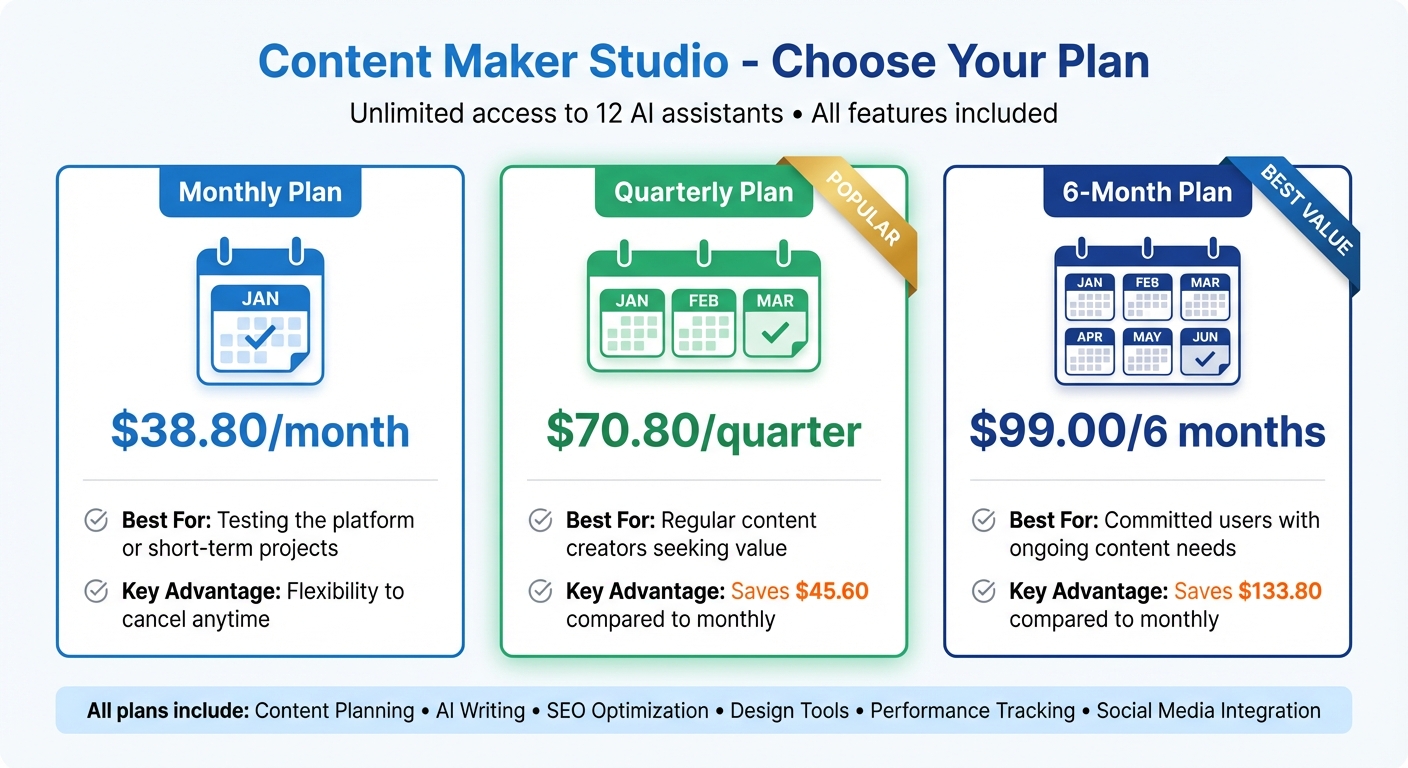
Content Maker Studio Pricing Plans Comparison
Content Maker Studio brings together 12 AI-powered assistants, streamlining every step of the content creation process - from planning to publishing. This all-in-one platform covers content planning, writing, design, audience research, trend analysis, SEO, and performance tracking. By consolidating these tasks, it eliminates the fragmented workflows that often slow down content teams. In fact, studies show that content teams can spend up to 65% of their time juggling tasks like brainstorming, drafting, editing, and managing deadlines [21].
The platform supports multiple languages and integrates seamlessly with popular social media platforms like LinkedIn, Instagram, and TikTok. You can draft, optimize, design, and schedule social media promotions without ever leaving the platform. Over time, the AI assistants learn and adapt to your brand’s unique voice, ensuring consistency across all your content.
Here’s how a typical workflow looks with Content Maker Studio. Start by using the Content Planner assistant to generate topic ideas tailored to current trends and your audience’s preferences. Then, provide a specific prompt to the Writing assistant to create your initial draft.
Once the draft is ready, the SEO assistant steps in, offering keyword suggestions and placement tips to enhance visibility without compromising readability. For visuals, the Design assistant generates custom graphics based on text prompts, allowing you to choose styles that align with your brand’s look and feel. Meanwhile, the Brand Voice assistant reviews the content to ensure it matches your established tone and messaging guidelines.
Before hitting publish, the Performance assistant analyzes your audience’s activity patterns and recommends the best times to post. After publishing, it tracks engagement metrics and delivers actionable insights to refine future content. This integrated workflow not only saves time but also boosts productivity by leveraging proven AI automation techniques [22].
Content Maker Studio provides three simple pricing options, all granting unlimited access to its 12 AI assistants and integrations:
| Plan | Price | Best For | Key Advantage |
|---|---|---|---|
| Monthly Plan | $38.80/month | Testing the platform or short-term projects | Flexibility to cancel anytime |
| Quarterly Plan | $70.80/quarter | Regular content creators seeking value | Saves $45.60 compared to monthly |
| 6-Month Plan | $99.00/6 months | Committed users with ongoing content needs | Saves $133.80 compared to monthly |
Every plan includes full access to all features, with no restrictions or usage limits. For teams focused on consistent content production, the quarterly and 6-month plans offer notable savings. According to a September 2024 DEPT survey, 78% of marketing teams are planning to enhance their AI capabilities, making these long-term plans a cost-effective choice [20].
Blending AI into your workflow can boost productivity, but it works best when paired with your expertise and creativity. Think of AI as your assistant - it’s there to help, not take over. The real magic happens when you combine AI's speed and efficiency with your deep understanding of your audience and brand. Use AI to handle repetitive tasks, while you focus on directing the strategy and polishing the final output.
AI-generated content often needs a human touch before it’s ready to go live. While it can churn out grammatically correct text in no time, it doesn’t always nail the context. That’s why it’s crucial to review drafts for accuracy, relevance, and how well they resonate with your audience. Be on the lookout for outdated information or logical inconsistencies that could slip through.
A step-by-step editing process can make revisions smoother. Start with the big picture - does the content address your audience's needs and align with your goals? Then, dig into the details: verify stats, technical information, and any claims made. Finally, refine the tone and style so it feels like it came from your brand, not a machine. By tackling these layers one by one, you’ll catch more issues and save time in the long run.
Once the structure and facts are solid, focus on adding your personal touch to make the content feel authentic.
Even with thorough editing, authenticity is key. Generic, cookie-cutter content won’t cut it with today’s audiences. This is where you step in - add your voice, insights, and examples to make the piece uniquely yours. AI is great for handling tasks like grammar checks or pulling together research, but it can’t replicate your expertise or personal perspective.
Fact-checking is essential. AI can sometimes present incorrect or outdated information with confidence, so double-check all statistics, quotes, and industry-specific details against trusted sources. This not only protects your credibility but also ensures your content provides real value to your readers.
AI is reshaping the way we create content, turning time-intensive tasks into quick and efficient processes. Research shows that AI tools can increase writing speed by over 50% while improving overall quality [23]. For instance, a medium-sized marketing agency reported a 62% reduction in content production time after using AI writing assistants for initial drafts and routine updates [1]. These time savings are game-changing.
But speed isn’t the only advantage. AI also improves SEO, ensures a consistent brand voice, and enables content scaling without overburdening teams. Take the example of a global e-commerce company: by using AI for product descriptions, they cut creation time by 73% and increased conversion rates by 42%, all while keeping their editorial team the same size [1]. This allowed their human writers to focus on high-value, strategic content instead of repetitive tasks.
Platforms like Content Maker Studio bring these benefits into one seamless system. With 12 AI-powered assistants, it handles everything from drafting and SEO optimization to performance tracking. For $38.80/month, you get tools that plan, write, design, and optimize content for various formats - whether it’s social media posts, blog articles, or technical documentation. The platform adapts to your brand voice and workflow, streamlining every stage of content creation. This integrated approach highlights how AI tools enhance efficiency and clarity throughout the creative process.
The real strength of AI lies in amplifying human creativity, not replacing it. By automating routine tasks like research, drafting, and grammar checks, AI frees you to focus on strategy, storytelling, and connecting with your audience. This collaboration between AI and humans allows modern teams to stay competitive while avoiding burnout.
AI tools make content creation smoother and faster by simplifying the drafting and editing process. They help improve the clarity, organization, and tone of your writing, ensuring it aligns seamlessly with your brand's voice.
By taking over tasks like fixing grammar, reworking sentences, and fine-tuning style, AI significantly cuts down the time spent on revisions. Plus, it provides smart recommendations for rephrasing and injecting fresh ideas, making your content more polished and engaging.
AI has become a game-changer in SEO, helping to fine-tune content for keyword relevance, search intent, and overall readability. It takes on tasks that often eat up valuable time, like weaving in keywords naturally, recommending effective meta tags, and organizing content to make it both engaging for readers and easy for search engines to understand.
With AI's help, you can craft content that not only ranks higher on search engines but also connects with the right audience. It streamlines the process of creating polished, optimized content, making it simpler and faster to meet modern SEO standards.
AI tools are great at keeping your brand's tone consistent. They use predefined style guides, custom prompts, and templates that match your brand’s voice and messaging. You can adjust these tools to follow specific language and style rules, ensuring that every piece of content aligns with how you want your brand to sound.
By understanding context and sticking to these rules, AI creates content that feels uniform across various platforms and formats. With regular human oversight and tweaks to the AI settings, you can refine this process even further, making it simpler to maintain a unified brand message.